AWS backup restore testing: prove recovery actually works
Only 10% of ransomware victims recover more than 90% of their data. How to test AWS backup restores on a schedule and turn results into audit evidence.
 Reviewed by
There's a line that shows up in every backup thread on r/devops: an untested backup is not a backup. Everyone upvotes it. Then the thread ends, and the scheduled restore test that everyone just agreed should exist still doesn't.
The numbers say this isn't a hypothetical gap. In Veeam's 2025 Ransomware Trends report, a survey of 1,300 organizations, 69% of companies believed they were prepared for an attack before it happened. After the attack, that confidence dropped by more than 20 points (Veeam, 2025). The preparation was real on paper. The recovery wasn't.
This guide walks through setting up automated restore testing with AWS Backup: scheduled restores, real validation of the restored data, and results you can hand to an auditor. We run this for the AWS environments we manage at safeINIT, mostly for health-tech and SMB teams, and the setup takes an afternoon. The hard part is deciding to do it.
Key takeaways
- Only 10% of ransomware victims recovered more than 90% of their data; 57% recovered less than half (Veeam, 2025)
- AWS Backup restore testing runs scheduled, automated restores and records duration and validation results
- A Lambda validation step turns "the job succeeded" into "the data is usable"
- Test results map directly to HIPAA 164.308(a)(7) and SOC 2 A1.3 evidence requests
Why do backups fail when you actually need them?
In 2025, Veeam's Ransomware Trends survey found that among organizations hit by ransomware, only 10% recovered more than 90% of their data, while 57% recovered less than half (Veeam, 2025 Ransomware Trends Report). These organizations had backups. Recovery still failed.
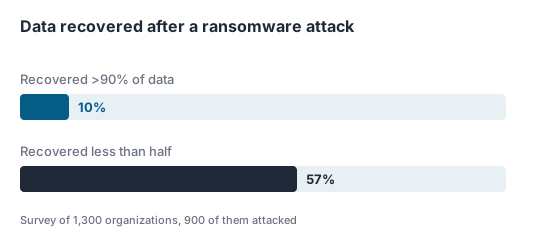
Source: Veeam 2025 Ransomware Trends Report
The same report has the detail that explains it. 98% of attacked organizations had a ransomware playbook, but fewer than half of those playbooks covered the technical basics: only 44% included backup verification and backup frequencies. The plan existed as a document. Nobody had proven the restore path.
Sophos found the operational consequence. In its State of Ransomware 2025 survey of 3,400 IT leaders, published in June 2025, only 54% of companies used their backups to restore encrypted data, a six-year low (Sophos, The State of Ransomware 2025). Nearly half paid the ransom instead. Paying a ransom while holding backups is what it looks like when nobody trusts the restore.
The failures we see in practice are rarely about the backup data itself. They're about everything around it: the KMS key the restore role can't use, the snapshot sitting in an account nobody can assume into, the RDS parameter group that no longer exists. None of that shows up in a backup job status. It only shows up in a restore.
And the meter runs while you find out. In 2026, Uptime Institute's Annual Outage Analysis reported that 57% of operators put the cost of their most recent major outage above $100,000, with one in five above $1 million for the second year running (Uptime Institute, Annual Outage Analysis 2026).
What is AWS Backup restore testing?
AWS Backup restore testing, released in November 2023, runs automated, scheduled restores of your recovery points and records whether they worked and how long they took (AWS What's New, 2023). It covers EC2, EBS, RDS, Aurora, DynamoDB, DocumentDB, EFS, FSx, Neptune, and S3.
The mechanics are simple. You create a restore testing plan with a schedule, then assign resources to it. On each run, AWS Backup picks a recovery point (latest, or random within a window you define, up to 365 days back), restores it, waits for your validation, then deletes the restored resource after a retention window you set between 1 and 168 hours. Test resources get tagged awsbackup-restore-test so your backup plans ignore them and your cost reports can find them.
The feature at a glance:
| Aspect | Details |
|---|---|
| Supported resources | Aurora, DocumentDB, DynamoDB, EBS, EC2, EFS, FSx (Lustre, ONTAP, OpenZFS, Windows), Neptune, RDS, S3 |
| Recovery point selection | Latest or random, from a 1-365 day window, across all or specific vaults |
| Test resource retention | 1 to 168 hours, then deleted automatically |
| Limits | 100 testing plans per account, 30 selections per plan |
| Validation | EventBridge event triggers your Lambda check, which reports through PutRestoreValidationResult (immutable once set) |
| Pricing | $1.50 per recovery point evaluated (US East example for EBS/EFS), plus restore and storage charges |
According to the AWS Backup Developer Guide, restore testing "provides automated and periodic evaluation of restore viability, as well as the ability to monitor restore job duration times," and the results can be used "to show compliance for organizational or governance requirements such as the successful completion of restore test scenarios" (AWS Backup Developer Guide, Restore testing, retrieved 2026). That second half is the part auditors care about.
Step 1: Decide what "recovered" actually means
By the end of this step you'll have a written definition of a passing test, per resource type. Without it, the testing plan proves nothing in particular.
For each critical resource, write down three things:
- The recovery time target. Not an aspiration, a number. If the answer is "the patient portal database must be restorable in under two hours," that's what the test measures against.
- The validation criterion. What check distinguishes usable data from a successfully created empty shell? A row count against a known threshold, an application health check against the restored instance, a checksum on a known file.
- The recovery point age you'll tolerate. Testing yesterday's backup proves something different from testing one from last quarter.
If you handle PHI, this step has a regulatory floor: HIPAA's data backup plan specification requires "retrievable exact copies of electronic protected health information" (45 CFR 164.308(a)(7)). Retrievable is the load-bearing word. We've written before about what HIPAA actually requires from AWS workloads; the contingency plan section is the part most teams leave until an auditor asks.

Step 2: Create a restore testing plan
The plan is the part you set once and stop thinking about: a schedule, a start window, and a rule for picking which recovery point gets tested. From then on, AWS Backup runs restores without anyone remembering to.
In the console: AWS Backup, then Restore testing, then Create restore testing plan. Set a name, a frequency, a start window, then assign resources. The same thing in the CLI:
aws backup create-restore-testing-plan \
  --restore-testing-plan '{
    "RestoreTestingPlanName": "weekly-critical-restore-test",
    "ScheduleExpression": "cron(0 4 ? * MON *)",
    "StartWindowHours": 8,
    "RecoveryPointSelection": {
      "Algorithm": "LATEST_WITHIN_WINDOW",
      "IncludeVaults": ["*"],
      "RecoveryPointTypes": ["SNAPSHOT"]
    }
  }'
Then assign resources to the plan with a selection: a resource type, an IAM role for the restore, and either specific ARNs or tag conditions. Tag conditions age better. A selection built on tags picks up new resources automatically; a hardcoded ARN list silently stops covering your estate the day someone creates a database you didn't list.
Verification: after the first scheduled run, the restore jobs appear under Jobs, in the Restore jobs tab, with a Restore testing creator, and the restored resources appear in your account, tagged, for the retention window you set.
One non-obvious setting worth attention: the restore IAM role. The default AWS Backup service role works until it meets a customer-managed KMS key it has no grant for. In environments we take over, an untested restore role missing kms:Decrypt and kms:CreateGrant on the data key is one of the most common finds. The restore test surfaces it in the first run. An incident would have surfaced it at 3 a.m.
Step 3: Validate restored data with a Lambda function
By the end of this step, a green test means the data was checked, not just that a resource was created.
Restore testing validation is event-driven. When a test restore completes, AWS Backup emits a restore job event through Amazon EventBridge. You point a rule at that event and trigger a Lambda function that inspects the restored resource: query the restored database and compare row counts, hit a health endpoint on the restored instance, read a sentinel object from the restored bucket. The function then reports the outcome through the PutRestoreValidationResult API (AWS Backup Developer Guide, Restore testing validation, retrieved 2026).
One detail in that API matters more than it looks for compliance: once a validation status is set on a restore job, it cannot be changed. Your test history is append-only. That's precisely the property you want evidence to have.
Keep the validation honest. A function that returns SUCCESSFUL unconditionally is a slightly more expensive version of not testing. If Lambda is new territory for your team, our AWS Lambda explainer covers the execution model this hangs off.
Step 4: Turn test results into audit evidence
This is the step that changes audit season. "Show me your recovery testing" becomes a report you export, not a meeting you dread.
The raw material is already there: every test run is queryable through DescribeRestoreJob and ListRestoreJobs, with creation date, duration, status, and the immutable validation result. AWS Backup Audit Manager adds a prebuilt control, "Restore time for resources meet target," which continuously evaluates whether tested restores completed inside the target time you declared in Step 1 (AWS Backup Developer Guide, controls, retrieved 2026).
Map that to the frameworks:
- HIPAA. 45 CFR 164.308(a)(7) requires a data backup plan and a disaster recovery plan, and its testing specification calls for "periodic testing and revision of contingency plans." Testing is an addressable specification, which does not mean optional: you implement it or document why an alternative measure is reasonable. A scheduled restore test with logged results is the straightforward way to address it. Our guide to becoming HIPAA compliant on AWS covers where this sits in the larger program.
- SOC 2. Availability criterion A1.3 reads: "The entity tests recovery plan procedures supporting system recovery to meet its objectives," with a point of focus that the "integrity and completeness of backup information is tested on a periodic basis" (AICPA, 2017 Trust Services Criteria with Revised Points of Focus 2022). A restore testing plan plus Lambda validation is close to a one-to-one implementation of that sentence.
For healthcare teams the stakes are above average: in 2025, IBM's Cost of a Data Breach report put healthcare's average breach cost at $7.42 million, the highest of any industry, with the longest identify-and-contain time at 279 days (IBM, Cost of a Data Breach Report 2025).
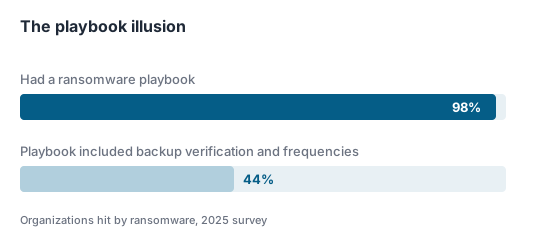
Source: Veeam 2025 Ransomware Trends Report
Step 5: Test the whole system, not just the resources
Single-resource tests can all pass while the actual recovery still fails. That gap is what this step closes.
Restore testing proves each resource comes back. It doesn't prove they come back together: in the right order, with DNS pointing somewhere sensible, with secrets and configuration the restored services can reach, inside your recovery time objective for the whole stack. That takes a periodic game day. Pick a scenario, restore the full application into an isolated environment, run it end to end, and time it against the objective you wrote in Step 1.
The same logic applies across accounts. If you copy backups to a separate account or region, test restores from that copy too. For anything ransomware-sensitive you should be copying: an isolated copy vault is the control that survives a compromised account. Run a restore testing plan in the destination account against the copied vault. A cross-account copy nobody has restored is the same rumor at twice the storage cost.
Twice a year is a reasonable cadence for a full exercise, with the automated per-resource tests running weekly or monthly underneath. The automated layer catches drift between game days. The game day catches what automation can't see, which is usually the runbook. If your architecture is event-driven, the restore-order question gets interesting; our piece on serverless architecture done right touches the dependency side of this.

Where restore testing goes wrong
The most common failure isn't skipping the feature. It's configuring it in a way that quietly proves nothing.
Testing only the easy resources. An EBS snapshot restore almost always succeeds. The multi-AZ RDS cluster with a customer-managed key and a custom parameter group is where restores fail, and it's exactly the resource teams leave out because a test copy costs money for a few hours. Test the resource whose loss would hurt.
Counting a completed restore job as a passed test. A restore job that reaches COMPLETED created a resource. Whether that resource holds usable, current data is a separate question, and it's the one that matters. No validation function, no proof.
Restoring into production networking. Test restores belong in isolated subnets with no route to production. A restored EC2 instance that starts talking to live services, or a restored database that jobs accidentally write to, turns a safety exercise into an incident.
Letting selections go stale. Infrastructure grows. A testing plan scoped to a hand-picked ARN list from January doesn't cover the databases created since. Tag-based selections and a quarterly review of what's covered keep the plan honest. This one comes from experience: coverage drift is the default state, not the exception.
Forgetting the test itself has an audit trail. Failed tests are evidence too. A failed restore test you investigated and fixed is a good compliance story. A failed test nobody looked at for six months is a finding.
Prove it before you need it
A backup nobody has restored is a rumor about your data. The teams in Veeam's survey had playbooks, budgets, and confidence, and 57% of them still lost more than half of what they were protecting. The difference between those outcomes isn't the backup tooling. It's whether anyone had proven the way back.
AWS Backup restore testing makes the proof cheap: an afternoon of setup, a few dollars a month, and an append-only record that recovery works. If nobody on your team can name the date of your last successful restore test, that's the gap to close this quarter.
It's also the kind of thing we build into every environment we operate. safeINIT runs managed AWS infrastructure for health-tech and SMB teams where restore testing, validation, and the audit trail are part of the baseline, not a project. That foundation is safeZONE. If you'd rather it just worked, start with a short assessment.
Frequently asked questions
How often should you test AWS backup restores?
Weekly or monthly automated tests for critical data stores, with a full recovery exercise once or twice a year. HIPAA’s testing specification says “periodic” without defining it, so your policy defines it; what matters to an auditor is that the schedule exists and the results show it ran.
How much does AWS Backup restore testing cost?
AWS charges per recovery point evaluated, $1.50 in US East (N. Virginia) for EBS and EFS for example, plus normal restore and storage charges for the test copies during their retention window. AWS’s own worked example lands at $52.50 per month for 25 monthly test restores (AWS Backup pricing). Against outage costs that exceed $100,000 for 57% of operators (Uptime Institute, 2026), it’s cheap insurance.
Does a successful restore job mean my data is safe?
No. A completed restore job means AWS created a resource from your recovery point. Validation is what confirms the data inside is usable and current: a Lambda function that queries the restored database or checks the application, reporting through the PutRestoreValidationResult API. In Veeam’s 2025 survey, 57% of ransomware victims recovered less than half their data; job status alone never predicts that.
Which AWS resources does restore testing support?
Aurora, DocumentDB, DynamoDB, EBS, EC2, EFS, FSx (Lustre, ONTAP, OpenZFS, and Windows), Neptune, RDS, and S3. Limits are generous for SMB estates: up to 100 testing plans, 30 selections per plan, and 30 protected resource ARNs per selection, with tag-based selection avoiding the ARN limit entirely.
Is restore testing enough for HIPAA or SOC 2?
It covers a specific slice: proof that backups are retrievable and recovery is tested, which maps to HIPAA 164.308(a)(7) and SOC 2 A1.3. You still need the documented contingency plan, criticality analysis, emergency mode procedures, and the broader control environment. Start from our AWS security best practices overview for the surrounding controls.