AWS service control policies: how to prove your guardrails actually work
An SCP that has never been simulated is a claim, not a control. How to prove a guardrail denies what you think it denies, and what the IAM policy simulator still won't tell you.
 Reviewed by
Most guardrails get written the same way. Someone on the platform team notices that an admin in a member account could spin up resources in a region the company has never operated in. They write an SCP with a deny on everything outside eu-central-1 and eu-west-1, attach it to the workloads OU, and close the ticket.
Then nothing happens. That's the problem.
A guardrail that works and a guardrail that quietly does nothing look identical from the outside. Both are JSON in a repo. Both show up in the console. The difference only surfaces when a deploy breaks in a way nobody expected, or when an auditor asks you to demonstrate the control and the honest answer is that you've never actually tested it.
Key takeaways
- An SCP never grants permissions. It sets the ceiling, and effective access is the intersection of the SCP, any resource control policy, and the identity-based and resource-based policies (AWS Organizations User Guide, retrieved 2026-08-01).
- AWS's long-standing advice for testing an SCP was a staged rollout: move accounts into an OU a few at a time and watch. That's a deployment procedure, not a test.
- The IAM policy simulator can include SCPs in an evaluation, and since July 2026 it can exclude a specific policy so you can model what breaks if you remove it (AWS What's New, 30 July 2026).
- The simulator will not evaluate resource control policies, and it deliberately hides which SCP statement produced a deny. Know these limits before you treat a green result as proof.
What does an SCP actually do?
An SCP sets the maximum available permissions for the IAM users and roles in your organization's member accounts. It grants nothing. If a role has no identity-based policy, an SCP that allows every action still leaves that role with no access at all (AWS Organizations User Guide, retrieved 2026-08-01).
Effective permissions are the logical intersection of what the SCP and any resource control policies allow, and what the identity-based and resource-based policies allow. Add a permissions boundary and the arithmetic gets stricter: the boundary, the SCP, and the identity policy must all allow the action before it happens.
Four behaviours catch teams out often enough to be worth stating plainly:
- SCPs don't apply to the management account. They only affect member accounts. A member account designated as a delegated administrator is still subject to them.
- SCPs don't restrict service-linked roles. Those exist so other AWS services can integrate with Organizations, and they sit outside the guardrail entirely.
- SCPs do apply to the member account root user. There is a short list of documented exceptions.
- Disabling the SCP policy type detaches every SCP in that root. The attachments are lost and are not automatically recoverable. You can reattach them by hand, assuming you know what was attached where.
The first one is easy to prove to yourself and worth doing once. Simulate any role in the management account with the SCP toggle switched on, and every action still comes back allowed. The SCPs are in the evaluation. They just have no purchase on that account. The last one is worth writing down somewhere your future self will find it.
For the broader account-structure context this sits in, see our guide to AWS security best practices.
Why writing the policy is not the same as having the control
SCP evaluation is deny-by-default, and that cuts both ways. For an action to be allowed, there must be an explicit allow at every level from the root, through each OU in the direct path, down to the account itself. For an action to be denied, a deny at any single level in that path is enough (AWS Organizations User Guide, retrieved 2026-08-01).
This is why AWS attaches a managed policy called FullAWSAccess to every root, OU, and account on creation. Remove it at any level without putting a replacement allow in its place, and everything underneath that level stops working. AWS documents this as a critical misconfiguration, and it is the most expensive way to discover that your organization's policy hierarchy does what you thought it did.
The official guidance on testing has historically been procedural. Don't attach an SCP to the root without testing the impact. Create an OU and move accounts into it one at a time, or in small numbers. Check service last accessed data in IAM, or read CloudTrail, to work out which services an account actually uses.
All reasonable. None of it is a test. It's a careful rollout with a rollback plan, which is a different thing, and it only tells you about the accounts you have already moved and the API calls those accounts happened to make while you were watching.
An unverified guardrail is a claim, not a control.
How do you simulate the deny before it ships?
The IAM policy simulator evaluates how AWS would handle a request against a set of policies without sending a real request to any service. Every simulation returns a binary outcome per action and resource: allowed or denied (AWS IAM User Guide, retrieved 2026-08-01).
It runs in two modes. Principal mode evaluates the policies already attached to an existing user, role, or group, and lets you add or remove policies for the simulation without touching what's attached in IAM. Custom mode evaluates policies you paste in, which is what you want for a policy that doesn't exist yet.
If your account belongs to an organization, you can include SCPs in the evaluation. The simulator applies service-aware logic to them, including global condition keys such as aws:RequestedRegion and aws:PrincipalAccount, and it evaluates condition keys and resource scoping inside deny statements.
The July 2026 update moved the simulator into the IAM console, added SCP inclusion, and added the ability to exclude specific policies so you can model a "what if I remove this?" scenario (AWS What's New, 30 July 2026). Cross-account simulations also report a decision per policy type in EvalDecisionDetails, but read that one carefully: it covers identity-based policies, resource-based policies and permissions boundaries. SCPs are not broken out there (SimulatePrincipalPolicy API reference, retrieved 2026-08-01).
It now lives at /iam/home#/policysim, and the console still carries a notice pointing at the legacy simulator "until it is retired", so links and bookmarks to the old standalone tool have not broken yet. The controls are plainer than the announcement makes them sound. SCP inclusion is a single toggle under Organization policies. Policy exclusion is a checkbox next to each attached policy under Identity-based policies. There is nothing to configure.
That gives you a three-step loop for any new guardrail:
- Simulate the deny. Take the action the SCP is supposed to block, run it against a principal in a target account with the SCP included, and confirm the result is denied.
- Simulate the allow you did not intend to break. Pick two or three actions that must keep working: your deploy role creating a stack, your monitoring role reading logs. A guardrail that denies more than you meant is the failure mode nobody writes a test for.
- Simulate the removal. Exclude the SCP and re-run step one. If the action is still denied without your policy, something else was already blocking it, and your guardrail is decoration.
Step three is the one that changes how the exercise feels. It's the difference between "the request was denied" and "the request was denied by this policy."
Running that round trip against a role holding AdministratorAccess shows the shape clearly. With the policy included, ec2:RunInstances comes back Allowed, with the reason given as an explicit allow in one statement.
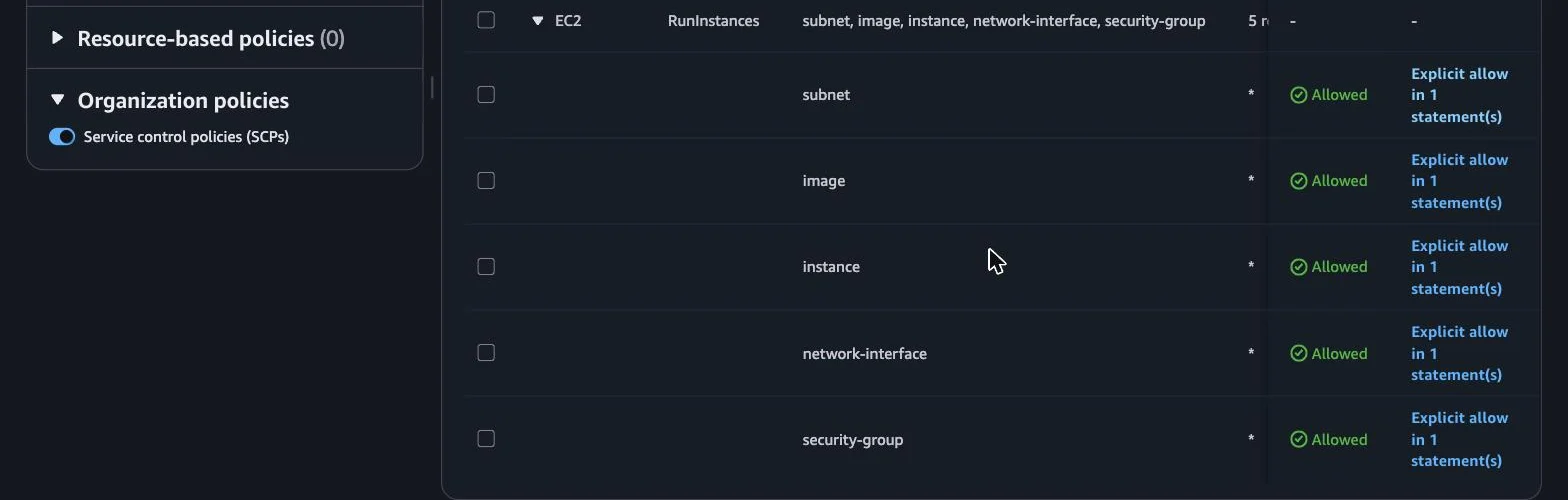
Untick the same policy and re-run, and every resource type flips to Denied, with the reason given as an implicit deny because no statement matched.
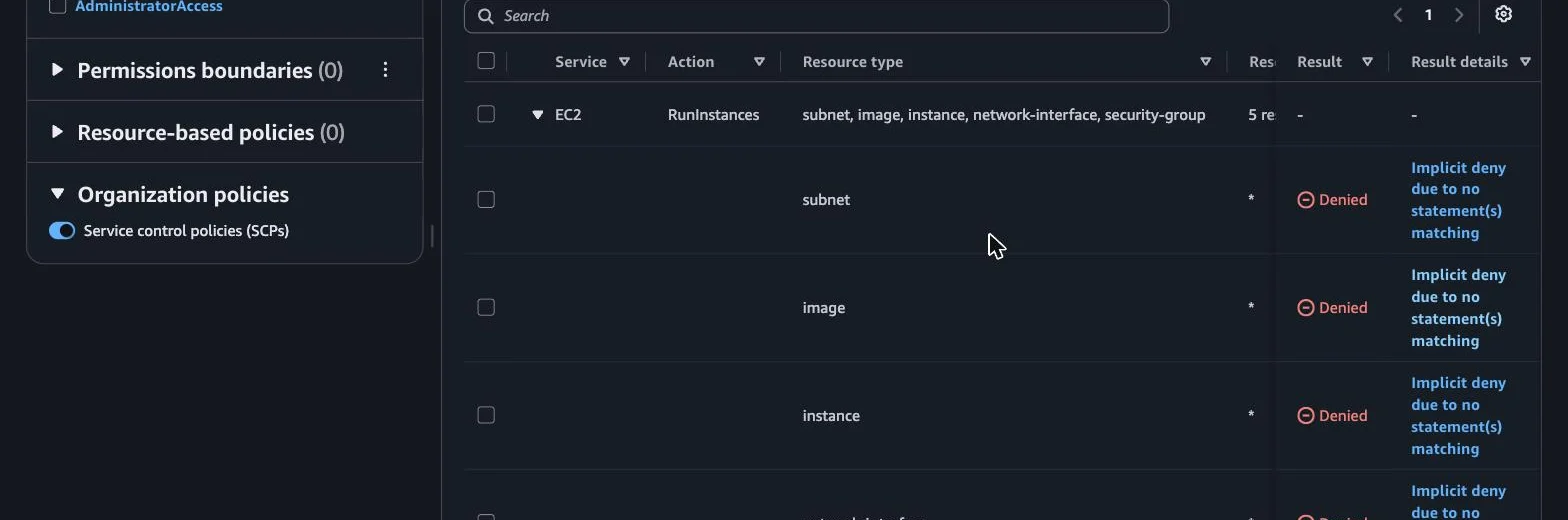
Nothing was detached in IAM. The simulation just answered the question you were going to find out the hard way.
The simulator populates some context for you: principal keys such as aws:PrincipalAccount, aws:PrincipalId, aws:PrincipalType, aws:UserId, and aws:UserName, plus organization keys including aws:PrincipalOrgID and aws:PrincipalOrgPaths. Every other condition key referenced by your policies is a value you have to supply.
What will the simulator not tell you?
This is the part that decides whether a green simulation is worth anything.
| Policy type | Evaluated by the simulator? | What to know |
|---|---|---|
| Identity-based policies | Yes | Matched statement is returned for allows and explicit denies |
| Permissions boundaries | Yes, one at a time | Boundary, SCP and identity policy must all allow |
| Service control policies | Yes | Service-aware, including aws:RequestedRegion; matched statement is not returned |
| Resource control policies | No | Not supported at all; any RCP in your perimeter is outside the test |
| Resource-based policies | Only if you supply them | Outside the console, the simulator won't fetch a resource's policy for you |
Resource control policies are not evaluated at all. The Organization policies panel offers exactly one control, the SCP toggle. No RCP option, no warning that anything is missing. The API is blunter about it: the PolicyExclusionList parameter documents that RCPs are unsupported and that identifiers targeting them are silently ignored (SimulatePrincipalPolicy API reference, retrieved 2026-08-01). If part of your data-perimeter story lives in RCPs, the simulation is quietly answering a narrower question than the one you asked.
For SCPs it also withholds the matched statement. Other policy types come back with the specific statement that drove the decision. SCPs deliberately don't, for security reasons, so you get the outcome without the reasoning. That makes a multi-level hierarchy harder to debug than an identity policy.
Condition keys are the third gap and the sharpest one in practice. In the console you can only supply values for keys that appear in your identity-based policies, permissions boundaries, or resource-based policies. A key referenced solely by an SCP has nowhere to receive a value. The CLI and API do accept them.
You can watch this happen. Simulate a role whose only attached policy is AdministratorAccess, with the SCP toggle switched on, and the Global request conditions panel reports that there are no global condition keys in the selected policies.
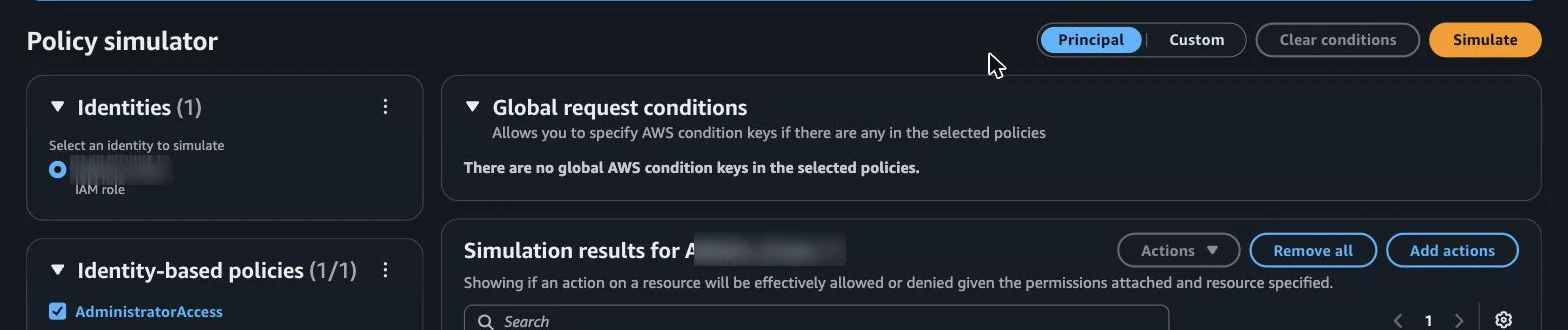
SCPs are in the evaluation, but the panel is reading the selected policies, so a region restriction keyed on aws:RequestedRegion has nowhere to receive a value. For that guardrail the console is the wrong tool and the API is the right one.
Then there is drift from live behaviour. AWS names VPC endpoint policies, role chaining, and multiple resource-based policies on one resource as configurations where the simulation and the real evaluation may not agree, and recommends checking against the live environment afterwards.
I don't think that last caveat undercuts the exercise. It does mean the honest framing is narrower than "we tested the guardrail": you verified the policy logic, and production verification is still a separate step. Worth being precise about which one you did when someone asks.
Putting the check in CI
A simulation you run once, by hand, before merging is better than nothing and worse than useless six months later, when three people have edited the OU structure.
The simulator is reachable through the IAM API as SimulatePrincipalPolicy, which means the three-step loop above can become test cases that run on every change to your policy repo. Step three even has a parameter of its own: PolicyExclusionList takes the policies to leave out, so the removal test is one field rather than a separate fixture. Because the API also accepts condition key values the console won't, this is the only practical route for guardrails built on region or tag conditions.
IAM Access Analyzer covers the adjacent question. Its custom policy checks answer whether a specific access is granted and whether a proposed policy grants new access compared with the current one (AWS IAM User Guide, retrieved 2026-08-01):
check-access-not-grantedasserts that a policy does not permit a specified action. This is your guardrail assertion.check-no-new-accesscompares a proposed policy against the existing one and flags any expansion. This is your regression test.check-no-public-accesschecks whether a resource policy could expose a resource publicly.
Each check for new access carries a charge, so read the pricing before wiring it into a pipeline that runs on every commit.
Use both. Access Analyzer asserts that the policy document doesn't grant what it shouldn't. The simulator confirms that the whole evaluation chain, SCP hierarchy included, produces the outcome you expect for a real principal in a real account.
Where does this matter most?
Every multi-account setup benefits from this. Regulated ones need it, because the gap between "we have a control" and "we can demonstrate the control" is exactly the gap an auditor is paid to find.
If you're operating under HIPAA, the controls you claim in your documentation are the ones you'll be asked to evidence. A region-restriction SCP that has never been simulated is a paragraph in a policy document, not a technical safeguard. Our guides on how to become HIPAA compliant in the cloud and securing AWS workloads for HIPAA cover the wider control set this fits into.
At safeINIT we build and run multi-account AWS foundations for health-tech and regulated teams, and the guardrail conversation comes up in nearly every engagement. The pattern that holds up over time is boring: write the policy, simulate the deny, simulate the removal, keep the simulation running after you've stopped paying attention.
Frequently asked questions
Do SCPs grant any permissions?
No. An SCP defines the maximum available permissions for IAM users and roles in member accounts. Access still has to be granted by an identity-based or resource-based policy. A principal with no permissions policy has no access, regardless of what the SCPs allow.
Why is my action denied when no SCP mentions it?
SCP evaluation is deny-by-default. An action is only allowed if an explicit allow exists at every level from the root through each OU down to the account. If FullAWSAccess was removed at any level without a replacement allow statement, everything below that level is blocked.
Can the IAM policy simulator test service control policies?
Yes. If your account is part of an organization, SCPs can be included in a simulation, and they are evaluated with service-aware logic including global condition keys. Two limits apply: the simulator does not support resource control policies, and it does not reveal which SCP statement produced a deny.
What's the difference between the policy simulator and IAM Access Analyzer custom policy checks?
The simulator evaluates how a request would be authorized against the full policy chain for a given principal. Access Analyzer custom policy checks operate on a policy document, answering whether a specified access is granted or whether a change expands access. Use the simulator for outcomes, Access Analyzer for regressions.
Do SCPs apply to the AWS Organizations management account?
No. SCPs affect member accounts only. Member accounts designated as delegated administrators are still subject to them. SCPs also don't restrict service-linked roles, and they can't restrict a short list of documented tasks.